Bulk Office work that cannot quietly go wrong
Two Windows desktop apps, batch .docx editing with verified backups and Outlook mail merge behind a review gate.
What was in the way
A change that takes ten seconds in one Word document takes an afternoon across four hundred. The tools that do it in bulk are usually the ones with no undo, so the safe option is to keep clicking.
The awkward cases are what force the manual route. Background shading sits in six different places inside a .docx, so clearing it means visiting each one. A mail merge where every recipient needs a table of their own rows is not something the built-in merge does.
How it was built
Both are Qt desktop apps rather than scripts, so the work is a file picker and a progress bar. Each carries a PyInstaller build config: a frozen binary needs freeze_support and module-level worker functions before multiprocessing runs at all.
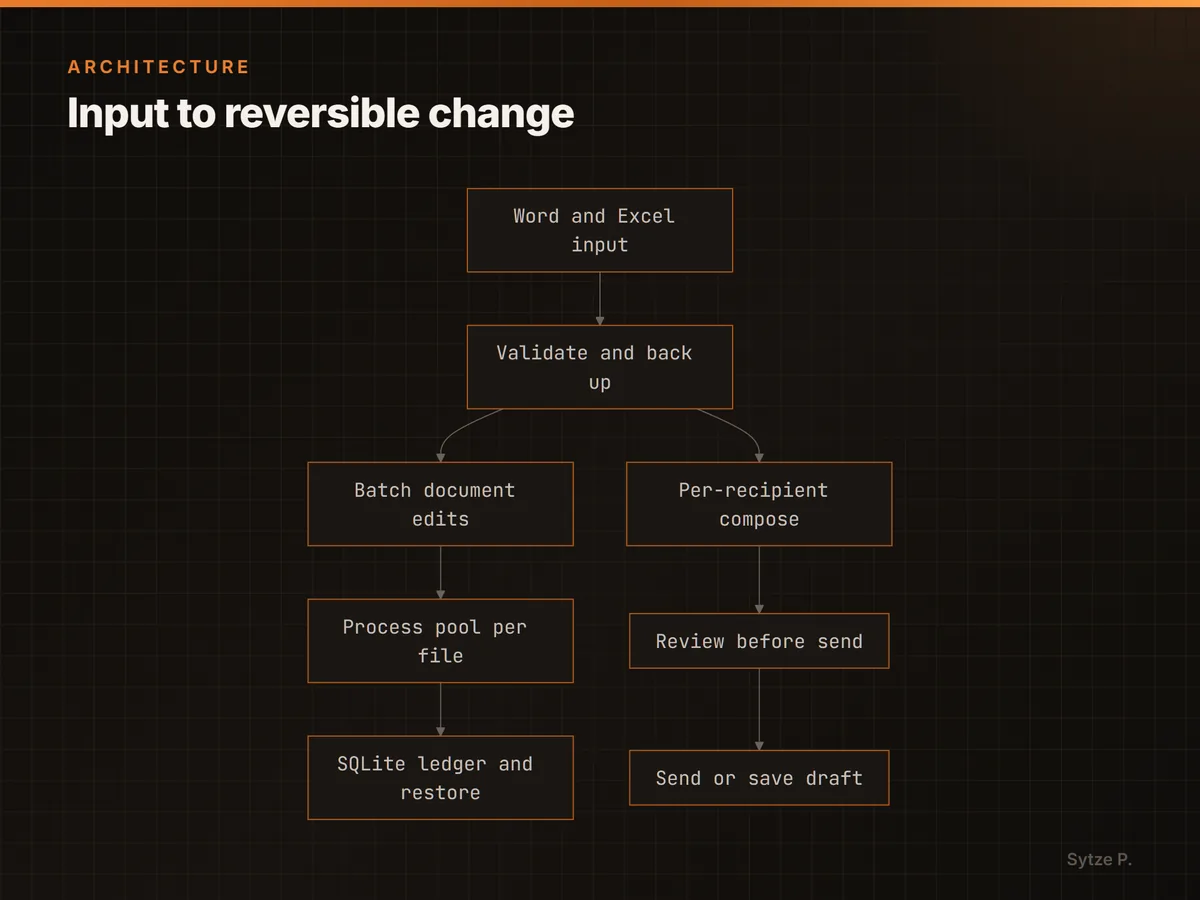
Neither tool does the irreversible thing first. The editor copies a file, reopens the copy with python-docx to prove it is readable, and only then lets the batch touch the original.
The mail merge validates rows before anything is composed, and a draft mode leaves the send itself to a human in Outlook.
How it works
Shading hides in six places
The remover walks body text, tables, text boxes in both drawing formats, headers and footers, and footnotes. It also strips the theme fills that silently override an explicit colour.
No character is replaced in silence
Reading Word's HTML export with a lenient decoder turned accents into replacement characters nobody noticed until the mail landed. It now tries each candidate encoding strictly and fails loudly instead.
Every run is reversible
Backups are recorded against their original path, so restoring is one lookup. Cleanup only ever expires backups that were never restored from.